24-Inch 165Hz FHD Monitor with FreeSync: Smooth FPS
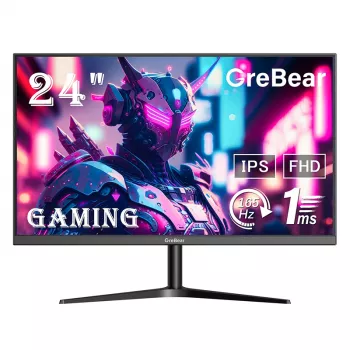
24-Inch FHD Gaming Monitor with 165Hz and AMD FreeSync: Smooth Play on a Compact Desk Setup
A 24-inch Full HD monitor paired with a high refresh rate can deliver fast, clear motion for competitive play while staying easy to fit on smaller desks. The combination of 165Hz and AMD FreeSync is all about making motion look cleaner, reducing distracting artifacts like tearing, and keeping control inputs feeling tight. Below is a practical breakdown of what these specs change in real gameplay, what to verify on your PC or console before buying, and which everyday settings typically make a 165Hz panel look and feel its best. For more guidance, see The 7 Best Gaming Monitors of 2026.
What a 24-inch Full HD screen is best at
A 24-inch 1920 × 1080 display hits a sweet spot for many setups because it stays sharp at normal desk distance without demanding a top-tier GPU. Text, minimaps, and HUD elements remain easy to read, and you can usually push higher frame rates than you would at 1440p or 4K. For further reading, see Best Gaming Monitors 2026: Budget, Curved, G-Sync and ….
- Comfortable pixel density for 1080p at typical desk distance, keeping text and HUD elements crisp without heavy GPU load.
- A popular size for esports-style games where quick scanning and reduced eye travel matter.
- Easier to drive at high frame rates than 1440p or 4K, which can be the difference between ~120 fps and ~165 fps on midrange GPUs.
- Practical choice for multi-monitor setups where two 24-inch displays fit more easily than larger panels.
Why 165Hz refresh rate feels different than 60Hz or 75Hz
Refresh rate determines how many times per second the screen can update. At 165Hz, the monitor refreshes far more frequently than 60Hz, which helps fast motion look less smeared during quick camera turns and rapid target tracking.
- Higher refresh rate reduces perceived blur in fast camera pans and rapid tracking, especially in shooters and racing games.
- Lower frame time at 165Hz (about 6.06 ms per refresh) can make input feel more immediate when the PC can keep up.
- The biggest uplift typically comes from 60Hz → 120/144Hz; 144Hz → 165Hz is a smaller but still noticeable refinement for fast motion.
- To benefit, aim for consistently high FPS: lowering shadows, post-processing, and resolution scale often helps more than chasing ultra textures.
For competitive titles, consistency is the real win. A steady 140–165 fps with stable frame pacing often feels better than a frame rate that swings wildly between highs and dips.
How AMD FreeSync helps when frame rate fluctuates
Even a powerful PC won’t output a perfectly locked frame rate in every scene. AMD FreeSync is designed to smooth out those fluctuations by matching the monitor’s refresh timing to your GPU’s frame delivery, reducing tearing without the typical feel of added latency that people associate with traditional V-Sync.
- FreeSync syncs the monitor’s refresh timing to GPU frame delivery, helping reduce tearing without the latency penalty often associated with traditional V-Sync.
- Best results come when the game’s FPS stays within the display’s variable refresh range; if FPS drops too low, behavior depends on the monitor and GPU features.
- Practical tuning tip: cap FPS a few frames below the maximum refresh (for example, ~160–162 fps on a 165Hz panel) to keep frame pacing steady.
- If a game feels stuttery, testing combinations of in-game V-Sync, driver-level sync, and frame caps can reveal the smoothest setup for that title.
To learn more about how the feature works at a technical level, see AMD FreeSync Technology. For port capability basics (which can affect whether you can hit 165Hz), the DisplayPort standards overview is also a useful reference.
Snapshot of the monitor’s core details
Use this quick view to confirm the basics before checking ports, ergonomics, and compatibility with your PC or console. Price and stock can change, so confirm the current listing for the most up-to-date information.
Key details at a glance
| Item | Value |
|---|---|
| Screen size | 24 inch |
| Resolution | 1920 × 1080 (Full HD) |
| Refresh rate | 165Hz |
| Adaptive sync | AMD FreeSync |
| Availability | In stock |
| Price | 117.32 USD |
PC and console compatibility checks before buying
Before committing to a 165Hz display, make sure the rest of your setup can actually deliver the refresh rate and signal quality you’re paying for.
Picture settings that usually improve clarity and reduce strain
Who this setup is a strong fit for
When to consider a different monitor instead
Product page for current pricing and availability
For the latest listing details, visit: 24 Inch FHD Gaming Monitor with 165Hz Refresh Rate and AMD FreeSync Technology.
More in-stock picks
- How to Learn and Grow from Mistakes – Digital Guide | how to grow from mistakes Mindset, Self-Growth & Resilience eBook for Personal Development
- 18K Gold Custom Alphabet Initial Necklace
FAQ
Does a 165Hz monitor make a difference if the PC can’t reach 165 fps?
Yes. The benefit scales with FPS: going from 60 fps to 100–140 fps is still a major improvement in motion clarity and responsiveness even if you don’t hit 165. FreeSync can also help smooth out fluctuations, and stable frame pacing often matters more than reaching the maximum number.
How does AMD FreeSync reduce screen tearing?
FreeSync allows the monitor to vary its refresh rate to match the GPU’s frame output, so the screen updates when a full frame is ready. That reduces visible tearing and can make motion look smoother than a fixed refresh rate with mismatched frame delivery.
What settings should be enabled to actually run at 165Hz?
Set the monitor refresh rate to 165Hz in your operating system display settings and confirm it in your GPU control panel. Use the correct port and a certified cable for that connection, then verify the game is running in a display mode that supports your chosen refresh rate.










Leave a comment