Make 3-Inch Pin Buttons: Kit + 500 Parts & Cutter
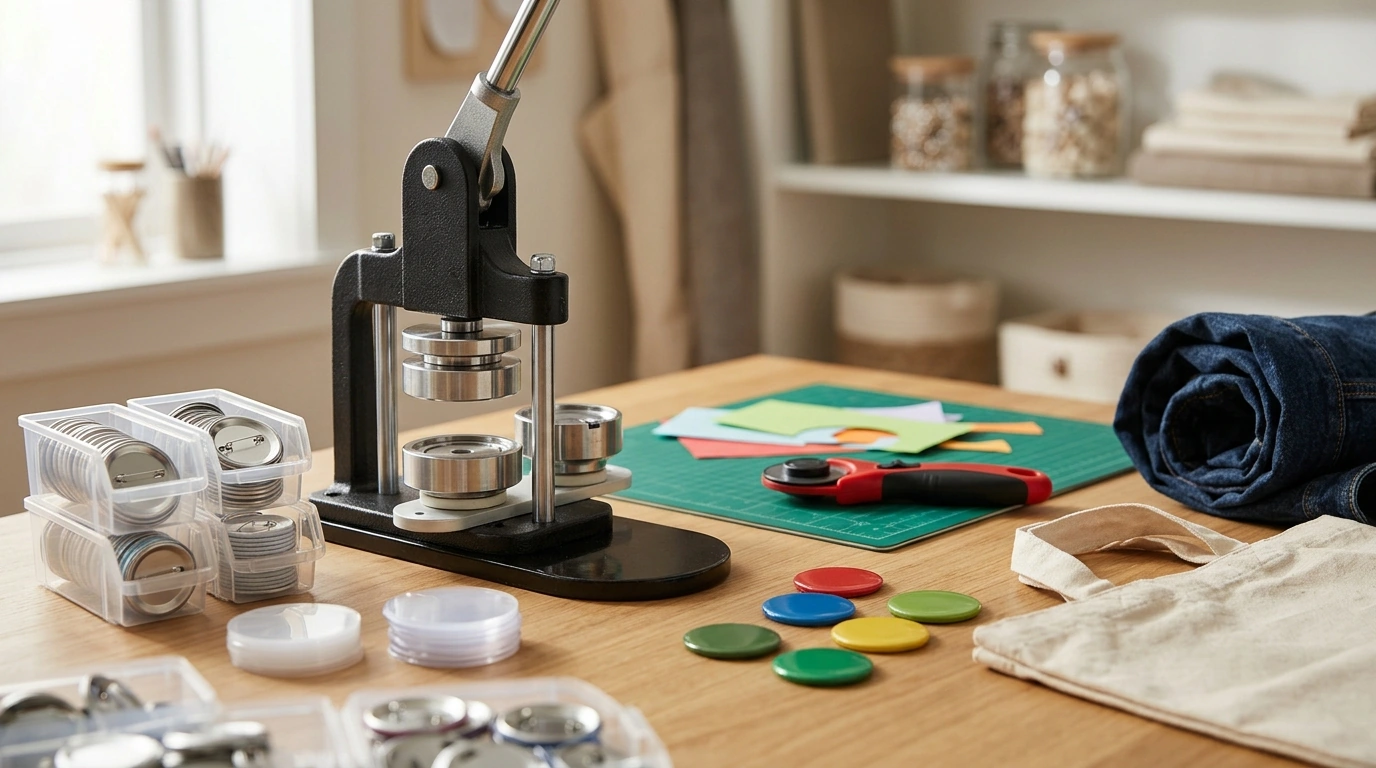
3-Inch Button Maker Kit with 500 Parts & Circle Cutter
A 3-inch button maker kit is a practical setup for producing large, easy-to-read pin-back buttons for events, classrooms, clubs, pop-up shops, and crafts. With the press, a supply of parts, and a circle cutter, the workflow stays consistent from design prep to finished button—especially when the cutter and button size are matched. For makers who want a dependable, repeatable process, a 3-inch format offers a generous canvas for bold text, simple logos, and photo-style designs that need to stay clear at a glance.
What this kit is best suited for
- Large-format 3-inch buttons that are easy to see on jackets, tote bags, lanyards, and display boards
- School spirit days, team identifiers, birthdays, baby showers, and fundraiser giveaways
- Small-batch merch for artists and makers who want quick turnaround without outsourcing
- Workshop activities where participants can make a finished item in minutes
- Photo-style or bold text designs where extra diameter improves legibility
What’s included and what each part does
A complete kit typically centers on three things: the press, the consumable button components, and the circle cutter. When those three match the same 3-inch system, it’s easier to keep your results consistent across a single button or a 100-button batch.
- Button press components: the press forms the layers together with consistent pressure for repeatable results.
- 500 button parts: pre-counted supplies help maintain rhythm in batch production and reduce mid-project restocking.
- Circle cutter: used to cut paper prints cleanly to the correct diameter so edges don’t wrinkle during pressing.
- Typical button layers: printed paper insert + clear plastic film (mylar) + metal shell + pin-back (exact layer types depend on the set provided with the kit).
Quick view: kit contents and purpose
| Item | Purpose | Why it matters for 3-inch buttons |
|---|---|---|
| 3-inch button maker/press | Crimps and assembles layers into a finished pin-back | Keeps button edges uniform and reduces misalignment |
| 500 button parts set | Provides shells/backs/films for multiple builds | Supports batch-making for events and bulk orders |
| Circle cutter | Cuts inserts to a consistent round shape | Prevents overhang that can cause wrinkles or incomplete crimping |
How to make a 3-inch button from start to finish
- Design at the right size: build your artwork at the template size recommended for your press, and keep a safe margin near the edge so key text doesn’t get folded under the crimp.
- Print with consistency: many makers use medium-weight paper for crisp color while still forming smoothly. Run one test print first to confirm color and scale.
- Cut clean circles: use the circle cutter to cut the printed circles evenly. Consistent cuts reduce jams, rework, and edge wrinkling.
- Load the first station: place the metal shell in the die, then add the printed insert, then the clear film on top (order can vary by press style, but the film typically sits above the paper on the face side).
- Press with a full stroke: use a steady, complete motion. Half-presses can leave uncrimped sections that feel sharp or look uneven.
- Attach the pin-back: move to the second station, align the pin-back, then press again to lock the layers together.
- Inspect and set aside: check that the pin-back sits securely and the edge feels smooth with no lifted metal lip.
If you’re unsure about sizing, it helps to remember that “3 inches” is a defined measurement (not a rough category). For reference on units and definitions, the National Institute of Standards and Technology maintains a clear overview of measurement standards at NIST.
Choosing paper, finishes, and designs that press well
- Paper choice: paper that is too thick may resist forming and can lead to wrinkles; paper that is too thin may look washed out. Test a few sheets before running a large batch.
- Finish clarity: a clean plastic film layer helps protect the print from scuffs and light moisture. Store films dust-free so specks don’t get trapped on the face.
- Edge-safe layout: keep faces, logos, and small text away from the outer rim so the crimp doesn’t hide key details.
- Contrast and readability: 3-inch buttons excel with bold type, simple icons, and high-contrast color palettes.
- Batch consistency: print all inserts from the same printer profile and paper stock to keep color and sizing stable.
Pin-back buttons are a classic “badge” format; for a quick overview of common styles and uses, see Wikipedia’s badge article.
Circle cutter tips for clean, repeatable cuts
Care, safety, and storage
When a 3-inch kit is the right size
In-stock picks
- 3-Inch Button Maker Kit with 500 Parts & Circle Cutter — a complete setup for pressing, cutting, and producing 3-inch pin-back buttons.
- 18K Gold Custom Alphabet Initial Necklace — a personalized accessory option when you want custom-style gifting alongside event merch.
- How to Learn and Grow from Mistakes – Digital Guide — a digital guide that pairs well with workshop settings where you’re building creative confidence and skills.







Leave a comment