1080P Bluetooth Camera Sunglasses: Features, Tips & Law

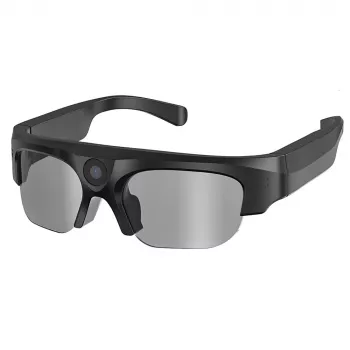
1080P HD Wireless Bluetooth Sunglasses Camcorder Video Recorder: What to Expect and How to Get Better Clips
Bluetooth camera sunglasses combine point-of-view video capture with hands-free audio, which can be handy for everyday moments, commutes, outdoor activities, and quick documentation when pulling out a phone is inconvenient. If you’re considering 1080P eyewear cameras, it helps to know what “HD” looks like in real life, how Bluetooth typically fits in, and which practical checks prevent shaky, tilted, or muffled footage.
What These Camera Sunglasses Are Designed to Do
Wearable camera glasses are built for convenience first: quick recording from your viewpoint without tying up your hands. Most models prioritize a lightweight frame, simple controls, and short, shareable clips rather than cinematic stabilization or all-day runtime.
- Record point-of-view video while keeping hands free
- Support wireless audio features via Bluetooth for calls or listening (device-dependent)
- Offer a discreet way to capture short clips during walks, rides, or events
- Reduce the need to hold a phone, which can be distracting or unsafe in some settings
If you want a straightforward option to start with, see the 1080P HD Wireless Bluetooth Sunglasses Camcorder Video Recorder.
Key Features to Look For in 1080P Wearable Eyewear (Quick Checks Before Buying)
Two products can both claim “1080P,” yet produce noticeably different results depending on frame rate, lighting, lens angle, and how easy it is to operate while moving. A fast checklist can help set realistic expectations and reduce returns.
- Video resolution and frame rate: 1080P is the headline, but smoother motion depends on frame rate and lighting.
- Lens position and viewing angle: Impacts how much of the scene is captured and whether the framing feels natural.
- Stabilization expectations: Many eyewear cameras rely on your posture and movement control rather than advanced electronic stabilization.
- Audio capture: Wind noise and distance matter; indoor speech often sounds clearer than outdoor clips.
- Battery life and heat: Compact wearables can warm up and usually trade long recording times for smaller size.
- Storage method: Confirm how video is stored and how files transfer to a phone/computer.
- Controls: Simple start/stop buttons are easier than multi-press sequences when you’re in motion.
| Feature | Why it matters | What to confirm |
|---|---|---|
| 1080P video | Sharper detail for everyday clips | Actual recording mode, not only listed capability |
| Bluetooth connectivity | Hands-free audio and device pairing | Pairing steps and supported device types |
| Battery runtime | How long continuous recording lasts | Typical minutes per charge and charging method |
| Storage/transfer | How quickly files can be backed up | USB transfer, app support, or removable memory (if applicable) |
| Ease of use | Reduces missed moments | Button layout, indicator lights, and simple controls |
| Comfort/fit | Wearability for long sessions | Weight, nose bridge comfort, and temple pressure |
Bluetooth + Camera: How the Two Work Together
Bluetooth is typically there for audio functions—like calls or listening—rather than for sending high-bitrate video in real time. For most camera sunglasses, the recording happens locally, and you review or transfer files afterward.
- Bluetooth generally supports audio features (calls/music) more than live video streaming.
- Video usually saves on the glasses first, then transfers later to a computer or phone.
- Pairing tip: fully charge first, enable Bluetooth on your phone, then pair once and reconnect later.
- If audio and camera functions are separate, confirm which buttons control recording vs. calls/music.
For background on how Bluetooth connections are designed to work across devices, visit the Bluetooth SIG overview.
Getting Better Footage: Practical Recording Tips
Most “bad” footage from camera glasses comes down to lighting, lens smudges, and fast head movement. A few small habits can make clips look dramatically more watchable.
- Prioritize bright, even light: Low light often creates noise and blur, even at 1080P.
- Move like the camera is on a tripod: Slow turns and steady posture reduce shake.
- Check your horizon: A slightly crooked fit can tilt the world up or down.
- Reduce wind noise: Block the wind when possible or capture shorter outdoor clips.
- Do a 10-second test: Confirm framing and audio before the moment matters.
- Clean the lens first: Fingerprints and dust cause haze and glare.
Everyday Use Cases (and When to Choose a Different Device)
Camera sunglasses shine when you want quick, natural POV clips without fussing with a phone mount. They’re less ideal when you need professional-grade stabilization, exceptional audio, or long continuous recording.
For gifting or pairing with everyday carry items, consider simple accessories like the 18K Gold Custom Alphabet Initial Necklace or the Square Moissanite Diamond Stud Earrings.
Privacy, Consent, and Where Recording Can Be Restricted
For privacy best practices and guidance, see the FTC’s privacy and security resources and the EFF’s Surveillance Self-Defense.
Care, Charging, and Long-Term Reliability
Troubleshooting Common Issues
FAQ
Can 1080P camera sunglasses record continuously for a long time?
Continuous recording is usually limited by the small battery size and heat management in compact wearables. Runtime varies by settings and conditions, so shorter clips and regular charging tend to be more reliable than trying to record for extended stretches.
Does Bluetooth send the video to a phone while recording?
In most cases, Bluetooth is used for audio features and basic connection functions, not for high-quality live video transfer. Video is typically saved on the glasses first and then transferred later for viewing or editing.
Is it legal to record with camera sunglasses in public?
Legality depends on where you are, and some places have stricter rules for recording audio than video. Even when public recording is allowed, private venues may ban cameras, so it’s smart to check local regulations and follow posted policies.









Leave a comment