Height-Adjustable AV Cart: Power Strip + Cord Control
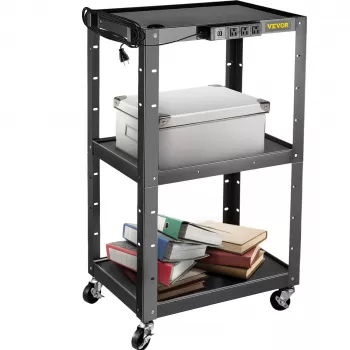
Height Adjustable AV Cart with Power Strip & Cord Management for Classrooms, Offices, and Training Rooms
A mobile AV cart that adjusts to the right working height can reduce clutter, protect equipment, and make setup faster for presentations, video conferencing, and hands-on training. With an integrated power strip and built-in cord management, this style of cart helps keep cables controlled while rolling between rooms or repositioning around a space.
What This AV Cart Helps Solve Day to Day
In shared spaces, the biggest productivity killer is usually small friction: hunting for outlets, untangling cords, and re-doing the same setup every time a cart moves. A height adjustable cart with power and cable routing is built to smooth out those repeat tasks.
- Prevents cable tangles by routing cords through dedicated management paths instead of hanging off shelves
- Keeps power centralized so devices plug into one place rather than stretching to wall outlets
- Improves ergonomics by raising or lowering the work surface to match standing presenters or seated operators
- Supports faster room turnover in schools, offices, and training labs by reducing teardown time
- Reduces trip hazards caused by loose power cords and AV leads
Core Features to Look For
Not all carts are designed for modern AV loads. Between power bricks, USB hubs, webcams, and small mixers, it’s helpful to choose a build that stays stable and keeps connections accessible.
- Height adjustment range that matches typical use (standing presentation, seated laptop operation, or equipment staging)
- Integrated power strip placement that keeps plugs accessible without exposing cords to snags
- Cord management channeling that separates power from signal cables when possible to reduce interference and clutter
- Stable shelf design for mixed loads (laptop, projector, document camera, small mixer, speakers)
- Locking casters for safety while presenting and smooth rolling when moving rooms
Fit and Setup Considerations Before Buying
A cart can look perfect online and still be frustrating in the real world if it doesn’t fit your pathways, power plan, or daily workflow. A few measurements and decisions up front prevent most surprises.
- Measure door widths, elevator access, and tight corners to ensure the cart can roll between rooms
- Plan cable paths: confirm there is enough slack for height changes without pulling on connectors
- Check outlet and cord length needs for where the cart will be parked during use
- Decide whether equipment will stay on the cart permanently or be removed after each session
- Confirm weight capacity needs for the heaviest combined setup, including power bricks and accessories
If you’re staging a projector and laptop, think about sightlines too. A cart that adjusts can help align a projector’s throw or bring a control laptop to a comfortable angle without stacking books or improvised risers.
Quick Comparison: AV Cart Features That Matter Most
Use this checklist to compare options quickly and avoid surprises during installation or daily use.
| Feature | Why it matters | What to verify |
|---|---|---|
| Height adjustment | Comfort and visibility for presenters and operators | Adjustment method and usable height range for seated/standing |
| Integrated power strip | Single-point power reduces wall-cable sprawl | Number of outlets, placement, and cord length |
| Cord management | Cleaner look and fewer snags/trip hazards | Channels/clips and clearance during height changes |
| Caster quality | Safe mobility with gear onboard | Locking mechanism, wheel size, and smooth rolling on your flooring |
| Shelf stability | Prevents wobble and protects equipment | Shelf size, lip/edge protection, and load rating |
Recommended Product Option
For spaces that need a reliable, roll-anywhere setup, a cart that combines height adjustment, integrated power, and cord routing keeps your equipment ready without the cable mess.
- Height Adjustable AV Cart with Power Strip & Cord Management: designed for mobile presentation and equipment staging with integrated power and cable organization
- Best for: classrooms, conference rooms, training spaces, and shared equipment setups where the cart moves often
- Ideal use cases: laptop + projector, video conferencing peripherals, small audio setups, demo stations
For teams that pair technical training with professional development, this digital resource can complement your training room setup by supporting coaching or onboarding sessions:
- How to Learn and Grow from Mistakes – Digital Guide: a mindset and resilience eBook that can be used in workshops or learning programs
Practical Tips for Cable Routing and Power Safety
Clean cable routing is about more than appearance. It reduces connector strain, makes troubleshooting faster, and helps keep walkways clear. For general electrical safety guidance in workplaces, reference OSHA’s electrical safety resources.
- Route power and signal cables separately when possible to reduce clutter and minimize interference with sensitive audio/video lines
- Leave a service loop (a small extra length of cable) near devices so height changes or repositioning do not strain connectors
- Use the cart’s cord management to keep cables inside the frame rather than dangling near wheels
- Avoid overloading the power strip; add up device wattage or amperage and keep headroom for startup surges
- Use surge protection where appropriate, especially for projectors, monitors, and sensitive conferencing equipment; for background on surge protective devices, see UL Solutions’ SPD basics
Where This Cart Works Especially Well
FAQ
Can the cart stay plugged in while moving between positions in a room?
For safety, unplug before rolling any meaningful distance. If you’re only shifting a few inches, ensure there’s adequate slack, keep the cord away from wheels, and lock the casters once the cart is positioned.
What devices typically fit on a height adjustable AV cart?
Common setups include a laptop, projector, document camera, small speakers, a webcam, a conferencing hub, and power bricks. Always confirm shelf dimensions and the cart’s total weight capacity for your combined load.
How does cord management reduce setup problems?
It prevents snags and tangles, keeps walkways cleaner, and makes it easier to trace connections during troubleshooting. It also reduces strain on ports and connectors when adjusting height or moving the cart.







Leave a comment